
Published
2009-12-07 19:01
We are working with PTP and Dharmatech to incorporate their work on Canvass and Phonebank into CiviCRM v3.1. Initially we plan to package and release this as the civicrm_canvass drupal module
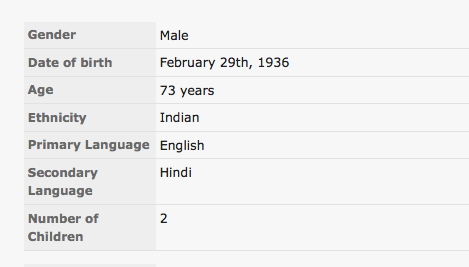
As part of this work, we need to "extend" the core demographic information in a seamless manner. CiviCRM holds the gender / birth date / deceased date as core fields. However PTP also wanted to collect additional demographic information: ethnicity, primary language, secondary language and number of kids. We plan on storing this additinal demographic data as a custom group. We had to inject this custom group into the demographic section for the contact view and edit forms. We also wanted to hide the custom group showing up as a tabbed pane in the contact view screen.
We accomplished all this using the all powerful and mighty hook system. We could inject a complete custom group into the edit field by implementing the buildForm hook and using some internal CiviCRM functions
{include file="CRM/Custom/Form/CustomField.tpl"}
{/foreach}
{/foreach}
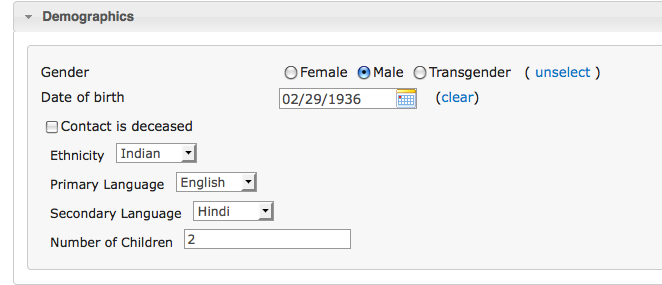 The changes for contact page view were along similar lines. You can check the svn repository for the specific view related changes.
 To hide the custom tab from showing up in the contact view screen, we implemented the hook_civicrm_tabs as follows:
        // grab the set of custom fields and their type from the DB
	// ensure that you have the demographic custom group ID set
        $groupTree =& CRM_Core_BAO_CustomGroup::getTree( 'Contact',
                                                         $form,
                                                         $form->getVar( 'id' ),
                                                         CIVICRM_CANVASS_DEMOGRAPHICS_ID,
                                                         null, null );

        // we should use simplified formatted groupTree
        $groupTree = CRM_Core_BAO_CustomGroup::formatGroupTree( $groupTree, 1, $form );

        // if there are fields to process
        if ( isset($groupTree) && is_array($groupTree) ) {
            $defaults = array( );
            CRM_Core_BAO_CustomGroup::setDefaults( $groupTree, $defaults);
            $form->setDefaults( $defaults );

            // lets build all the form elements with one nice function call
            CRM_Core_BAO_CustomGroup::buildQuickForm( $form, $groupTree, false, 1,
                                                      CIVICRM_CANVASS_DEMOGRAPHICS_PREFIX );
        }
We also need to modify the templates to inject these custom fields at the right place. I had to restructure the contact edit template so that the demographics had their own separate tpl. This makes it much easier to override just the demographics tpl. I added the following lines of code to the restructured tpl towards the end of the file:
  {foreach from=$demographics_groupTree item=cd_edit key=group_id}
     {foreach from=$cd_edit.fields item=element key=field_id}
The changes for contact page view were along similar lines. You can check the svn repository for the specific view related changes.
To hide the custom tab from showing up in the contact view screen, we implemented the hook_civicrm_tabs as follows:
function civicrm_canvass_civicrm_tabs( &$tabs, $contactID ) {
    foreach ( $tabs as $tabID => $tabValue ) {
        if ( $tabValue['title'] == CIVICRM_CANVASS_DEMOGRAPHICS_TITLE ) {
            unset( $tabs[$tabID] );
        }
    }
}
Due to some core civicrm changes, this code will only work in 3.1 and later. I also did not add the custom fields to the advanced search form.
Comments
What will be about people speakin mro of a language?
(My girlfriedn is speaking 5 laguages, and who know about future?)
And about people born from the mix of an India and an European and he live around the world, which will be him etnicity?
All the fields in the screenshot above - OTHER THAN Gender, Date of Birth and Is Deceased - are defined in the Demographics custom data group. This means you can add, remove or change things like language(s), ethnicity, etc. to meet your needs.
I am not a programmer, can I just add the dob and gender to a custom data group with other demographics?