
CiviMobile New Milestone: Full Compatibility with the Latest Standalone Version
The CiviMobile team has officially announced the new release of CiviCRM Standalone, available in the app without any CMS attachments. Since June 16, 2025, customers can leverage the full functionality of CiviMobile that doesn’t rely on Joomla, WordPress, or Drupal CMSs.
This is more than an ordinary update, but new opportunities for customers in terms of availability and flexibility. Those seeking a mobile-first approach, RESTful APIs, and responsive design can now harness the power of CMS-less extensions to boost efficiency and reduce costs.
Why was reviving CiviCRM Standalone a necessity for many users?
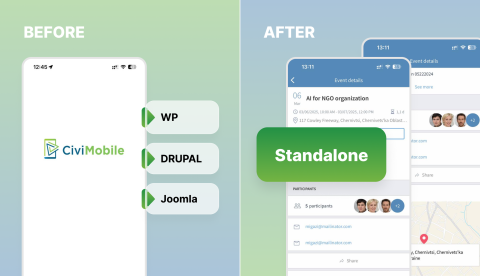
While traditional integrations with CMSs offered powerful features and enhanced flexibility, they also posed several challenges for small organizations and teams with limited resources. Here are some of the common issues customers faced before the appearance of Standalone mode:
- Installation and maintenance require specific skills. Integrating both CRM and CMS meant managing two separate systems. Each of them had its own dependencies, plugins, security patches, configuration files, and should be regularly updated. This added extra efforts along with additional expenses. A simple project can quickly become a complex technical setup, requiring dozens of IT specialists to ensure everything runs smoothly.
- CMS upgrades could break compatibility with CRM. New releases of Drupal or WordPress may introduce unexpected bugs, resulting in a temporary loss of access to vital CRM data and rendering functionality unavailable. It may take some time before related extensions and patches become available for installation. Such a situation for small NGO’s could negatively impact stable work and increase the complexity of system management.
- Limited suitability for mobile and SaaS cases. While CMS’s were developed primarily for websites, with CRM’s linked to such systems, it became harder to follow a mobile-first approach or enter CRM functionality without CMS verification.
- Performance downgrade. CMSs with dozens of background processes, such as theming, routing, and caching, could overload servers. On shared hosting, such situations can result in increased memory usage, slower page loads, and a decrease in total performance (especially in CRM systems with large databases).
- Security risks. As CMSs are often targeted goals for cyberattacks due to their popularity, connected CRM systems could also become vulnerable to scams. Organizations should monitor both systems for timely updates and detect suspicious behaviour, which appeared to be an additional burden for teams without regular IT staff.
For users who required only CRM functionality, CMS’s integrations were massive overkill for their current needs and budgets. However, now things have changed, and everything that customers could do within a CiviCRM and connected CMS is now possible with a Standalone extension.
How Standalone benefits customers
Standalone mode can be a perfect choice for small NGOs with limited finances that don’t have in-house IT experts to maintain a CMS, field teams searching for a reliable and convenient CRM available on mobile devices, or SaaS providers offering white-label CiviCRM-based services. It provides a range of benefits critical for non-profit goals:
- No CMS required. Now, users don’t have to install and manage Drupal, WordPress, or Joomla.
- Simplified setup. With a light-weight and convenient architecture, working with your CRM becomes easier than ever.
- Faster deployment. Composer enables clients to install and run Standalone applications more quickly with fewer dependencies.
- CiviCRM continues to support CMS integrations, providing a cost-effective, all-in-one solution for potentially scalable organizations.
- Native authentication and access control lists (ACLs). Now, users can initiate login logic via Standalone mode on their mobile gadgets without relying on any CMS.
How to get started and what you can do with the app?
To start using CiviCRM Standalone on mobile, you should do the following steps:
- Install the module via Composer or any other convenient way.
- Install the CiviMobileAPI extension (version 6.x is required).
- Visit the App Store or Google Play to download the CiviMobile App.
- Connect the app with a Standalone tool using a URL and your customer data.
That’s it. You don’t need any CMS or extra plugins to get things done. Now you can use the entire functionality of CiviCRM for the following tasks:
- managing contacts;
- organizing and controlling events;
- searching and filtering participants and projects;
- adding notes and activities;
- sending push notifications;
- tracking tasks and much more.
The Bottom Line: CiviMobile's latest updates and why they matter
The new CiviMobile announcement is centered around a revised Standalone extension, which makes the originally CMS-agnostic CMR an independent and easy-to-use product for nonprofits:
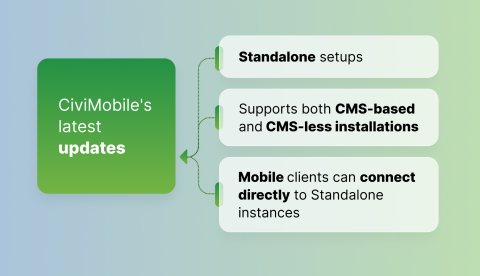
- CiviMobile API extension now fully works with Standalone setups. Customers no longer need any CMS for authentication or routing.
- The newest version of the CiviMobile API (v6.7 in May 2025) aligns with CiviCRM's core updates and supports both CMS-based and CMS-less installations.
- Mobile clients can connect directly to Standalone instances (starting from the 9.1.0 version of the CiviMobile App, released on June 16, 2025), including out-of-the-box.
This update is life-changing, as it enables CiviMobile to expand its reach to customers who couldn’t previously afford to work with CMS-based platforms. It ensures faster performance and fewer management tasks for NGOs, field teams, and SaaS-powered services.
